Run a REPL in a MonkeyCI job
Wout Neirynck - 2026-03-06
Even if you write your code following all known TDD rules (which of course, you all do, don't you?), you still might end up with cryptic errors in your build pipeline. Now, one of the strong points of MonkeyCI is that it allows you to run your builds locally. But more imporantly, you can also write unit tests for your builds. With these two powerful weapons in hand, you can take care of most of the issues that may come up in your remote build pipelines.
Murphy's Law
But one of the corollaries of Murphy's Law (which holds more power in IT than anywhere else, I think) is the following: "If things can go wrong in several different ways, and you protect against each of them, an additional way will promptly develop."
In those situations you can add more logging, but this leads to a frustrating cycle of trial-and-error that wastes all your precious build credits. Fortunately, Clojure is one of those enlightened languages that provides a REPL. Now, while we all like to go on and on about the virtues of that wonderful feature, I don't want to make this blog post too long. Suffice to say that you can even connect to the REPL remotely, using nREPL. Wouldn't it be wonderful if you could do that in your build pipelines as well?
A Contrived Example
MonkeyCI's latest version has a new, powerful feature that allows container jobs to expose ports to the outside world. Even though CI/CD pipelines should behave in a predictable and reproducible manner, there are some situations where you want to be able to connect to some kind of server that a job has started, e.g. for verification or debugging purposes. This could be a webserver, a database, or, in this example. an nREPL server.
Let's set up a small example. This is a simple build script that runs Clojure unit tests:
(ns build
  (:require [monkey.ci.api :as m]))

(def unit-tests
  (-> (m/container-job "unit-tests")
      (m/image "docker.io/clojure:tools-deps-trixie")
      (m/script ["clojure -X:test"])))
You could also use the clj plugin for this, but for sake of clarity we're just using the basic built-in functions.
Now, if we'd want to "take a peek" at what's going on inside those tests, we could set up an nREPL server. This could be as easy as adding a few lines of code:
(ns my-project.my-tests
  (:require [clojure.test :refer :all]
            ;; ...
	    [nrepl.server :as nrs]))

;; Start the nrepl server at port 7888
(defonce nrepl-server (nrs/start-server :port 7888 :bind "0.0.0.0"))

(deftest some-test
   ;; ....
   )
Note that we need to :bind to 0.0.0.0 to force the nREPL server to accept connections on the external network interface, otherwise you'd only be allowed to connect from localhost. Also, don't forget to add the nREPL dependency to your deps.edn:
{:deps {nrepl/nrepl {:mvn/version "1.5.2"}}}
Alternatively, you can even just start an entire separate process:
(def nrepl-job
  (-> (m/container-job "unit-tests")
      (m/image "docker.io/clojure:tools-deps-trixie")
      (m/script ["clojure -M -m nrepl.cmdline -p 7888 -b 0.0.0.0"])))
That's all fine and dandy, but how can we connect to that server from the outside?
Opening up the Ports
In MonkeyCI, you can tell the job that one or more ports need to be accessible from the outside by means of the :expose property, or, using the API, the expose function. Like so:
(def nrepl-job
  (let [port 7888]
    (-> (m/container-job "unit-tests")
        (m/image "docker.io/clojure:tools-deps-trixie")
        (m/script [(format "clojure -M -m nrepl.cmdline -p %d -b 0.0.0.0" port)])
        (m/expose [port]))))
Very simple! Now this will be tell the build agent to map port 7888 to a randomly chosen port (from a configured range). For example, it may forward host port 20342 to 7888. In order to know the ip address and the mapped port, you just have to navigate to the job in question, and open up the "Details" tab. You will see something like this:
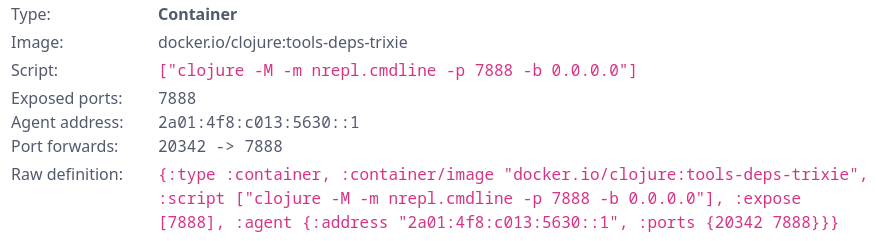
With this information, we can connect to our job running somewhere in the cloud:
$ clj -Sdeps '{:deps {nrepl/nrepl {:mvn/version "1.5.2"}}}' \
  -M -m nrepl.cmdline \
  --connect --host 2a01:4f8:c013:5630::1 --port 20342
We're in business! From there you can do everything you would be able to do when running the REPL locally.
Caveats
Now there are some things to look out for.
First of all, you can only connect to the job as long as it's running (duh!) In the above example, the nREPL server will block until you explicitly stop it, for example by running (System/exit 0) when connected. To avoid blocked jobs from running indefinitely, there is a built-in timeout of 20 minutes (which can be overridden). After that, the container process is killed.
Second, with great power comes great responsibility! Opening up ports to the outside means they really are open. For the whole world! So you'd best set up some security. For nREPL it's possible to configure TLS certificates, and there are probably also middlewares available that allow you to configure credentials.
Conclusion
MonkeyCI gives you additional power to quickly solve CI/CD pipeline problems without wasting your time. So you can focus on the things you like to do, most likely building new features in your app!
This feature opens up a whole range of new use cases, of which this is just a single example.